Cuvatrix

Build stronger copper invoices. Prove every number.

Cuvatrix applies each client's confirmed contract to the month's truck data, searches for higher-paying invoice groupings, and produces Excel and PDF evidence that reconciles to the cent.

Already use Cuvatrix? Sign in to the secure app.

Where an invoice lands Demonstration data
Grade LME 9,000 LME 9,500 LME 10,000+
3%51%52%53%
4%54%55%56%
5%56.5%57.5%58.5%
6%58.5%59.5%60.5%
7%60%61%62%
8%+61%62%63%
The invoice's average grade picks the row and the LME picks the column. A row runs from its grade up to the next one, so an invoice averaging 4.99% is paid at the 4% row.

The invoice changes the value.

A truck has no fixed price. The invoice it joins sets the invoice's average grade, and that average picks the payable row. Put the same trucks into different invoices and the contract pays a different amount.

Eight trucks, one contract, LME 9,500, two invoices each way. Matrix payable only: the bonus, acid and commission rules apply on top, the same way to both.

Grouped in arrival order

The first four trucks on one invoice, the next four on the other.

T1 3.4%T2 3.8%T3 4.9%T4 5.2%
Invoice 1: 120 t dry, averaging 4.34%, paid at the 4% row (55%) $27,232.70
T5 6.1%T6 7.4%T7 4.4%T8 8.3%
Invoice 2: 117 t dry, averaging 6.52%, paid at the 6% row (59.5%) $43,094.66
Settlement$70,327.36
Grouped by Cuvatrix's search

The same eight trucks, placed so the first invoice averages above 5%.

T1 3.4%T2 3.8%T5 6.1%T6 7.4%T7 4.4%
Invoice 1: 148 t dry, averaging 5.05%, paid at the 5% row (57.5%) $40,788.49
T3 4.9%T4 5.2%T8 8.3%
Invoice 2: 89 t dry, averaging 6.03%, paid at the 6% row (59.5%) $30,348.27
Settlement$71,136.76

Same trucks, same contract: +$809.40, because one invoice crossed a row line. On a real month of hundreds of trucks, the search weighs every such line at once.

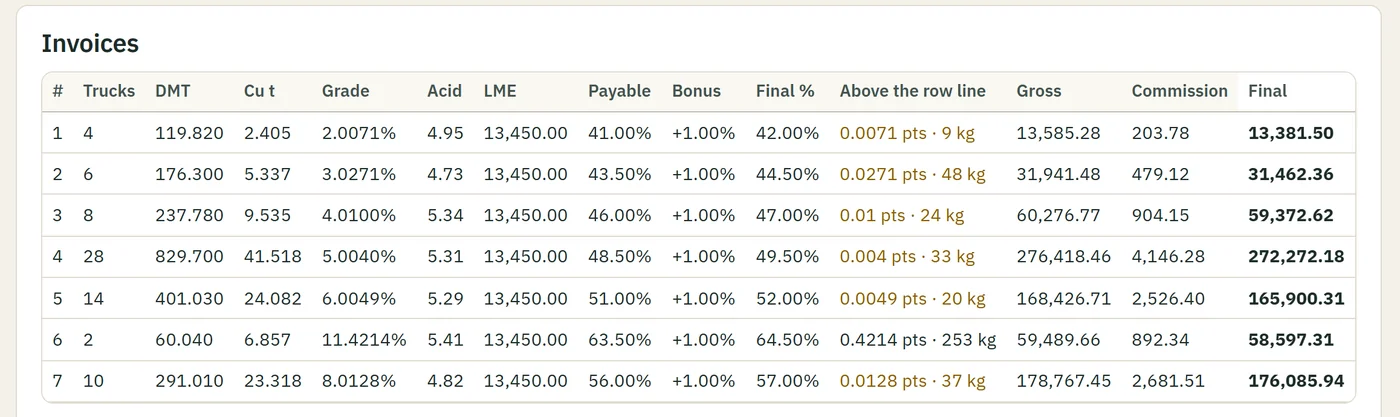
The invoice table of a calculated month in Cuvatrix: seven invoices, each with its trucks, tons, average grade, acid, payable, bonus and final amount.
The same idea on a full month in the app: 72 trucks in seven invoices, each placed just above a grade line (the "Above the row line" column). Demonstration data: Demo Copper Ltd is a fictional client.

From the workbook to invoices you can defend

The month's work, in the order it happens.

  1. Confirm the contract

    The chart and its clauses become explicit settings: the payable matrix, bonuses, cap, acid, commission and low-grade treatment, each checked against the chart.

  2. Import the month

    Load the delivery workbook: trucks, weights, moisture, grade, acid, LME and dates, with its structure checked before anything is priced.

  3. Resolve the preflight

    See which trucks are included, excluded, unpaid or waiting for a decision, and which contract reading will be used, before the money is calculated.

  4. Search the groupings

    A separate worker searches for a higher-paying grouping that keeps every rule, using an exact solver where the month allows it.

  5. Inspect the result

    Review the invoices, totals and penalties, a proof of optimality or the remaining gap to the ceiling, and the difference from a grouping you supply.

  6. Export the evidence

    Download Excel and PDF reports stamped with the contract and the run they come from.

How each step works

Evidence, not a black box

Every result says where it comes from and how far it can be trusted.

Preflight before moneyThe trucks and clauses a run will use are shown before it starts.
Result proofAn exact run that completes is certified optimal; any other run shows how close it is to the mathematical ceiling.
Rebuild to the centThe stored inputs, settings and grouping must reproduce the saved total, or the result is not trusted.
ComparisonA total and a truck-to-invoice grouping you supply are priced under the same contract and compared, rule by rule.
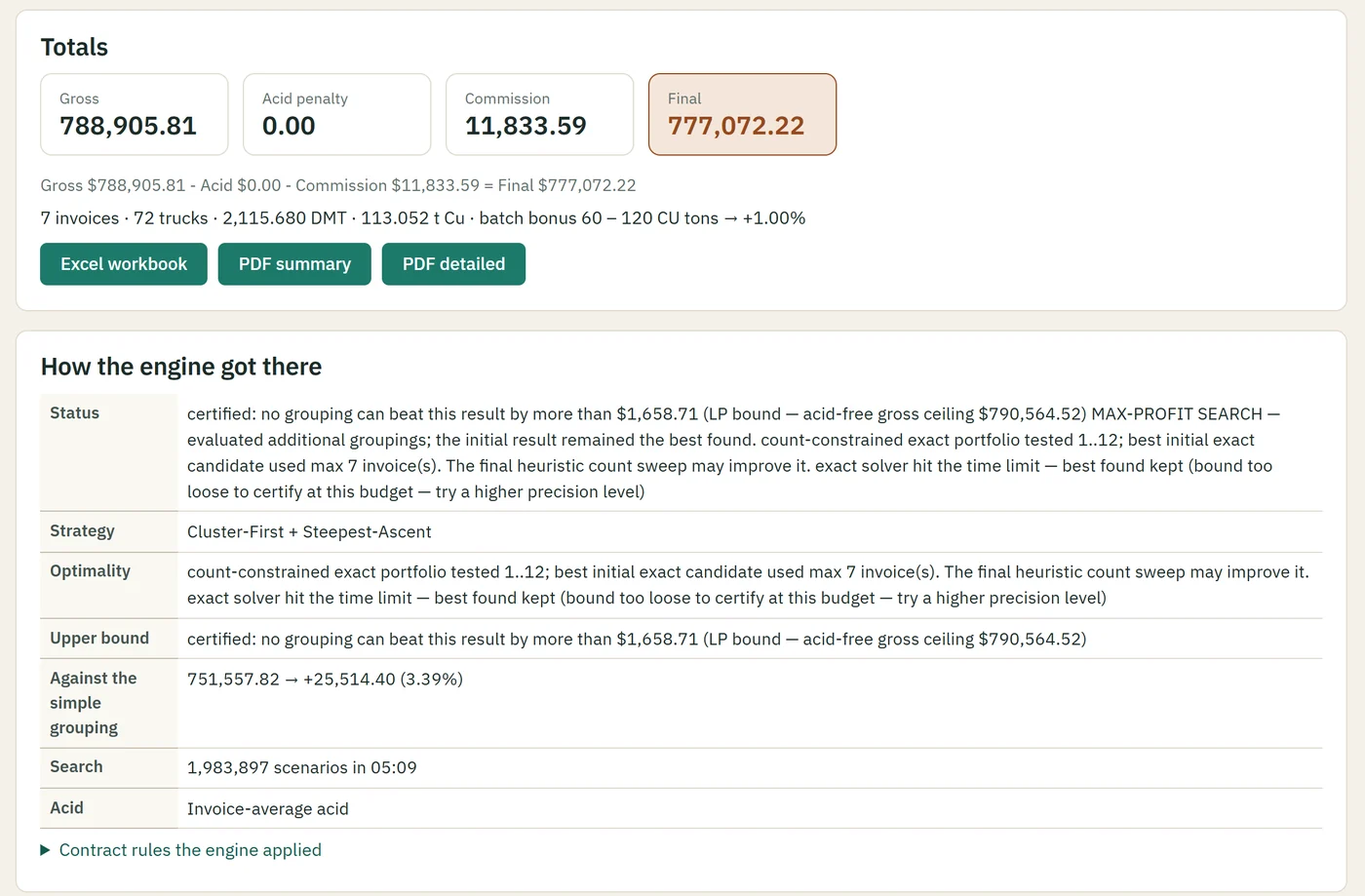
A result in Cuvatrix: gross, acid penalty, commission and final totals, the downloads, and how the engine got there, with its upper bound and the gain over a simple grouping.
A month's result in the app: the totals, a bound no other grouping can beat by more than $1,658.71, and +$25,514.40 (3.39%) over grouping the trucks simply. Demonstration data: Demo Copper Ltd is a fictional client.

Built for controlled financial work

Designed to reduce silent errors, with the controls named.

  • Named roles. An owner and accountants, each seeing what their role needs.
  • Three-part sign-in. Email, password and an authenticator code.
  • Activity history. Every change, run, download and sign-in, with the person and the time.
  • One calculation at a time, in a worker process kept apart from the web interface.
  • Versions and fingerprints. Contract versions, run history and reproducibility checks.
  • Backups. Daily copies, and a safety copy before any restore.
  • Local first. Calculations and primary records stay on the office computer, reached through a secure tunnel.
  • Private review. A one-day link lets an invited auditor check a client's settings.

How Cuvatrix handles your data

Compatibility is confirmed first

Every payable chart and contract can express its rules differently. We review compatibility and confirm the money-changing settings with you before the first live run.

Bring a recent month's workbook and the client's chart. We set the contract up together, check each setting against the chart, and run the month before anything is relied on.

Bring the workbook. Bring the contract. See exactly how the invoices resolve.

Access is issued by the Cuvatrix owner; there is no public account creation.